AutoCAD Intelligent Assistant: AI-Driven Design and UltraLAB Graphics Workstation Hardware Selection
WeChat Sync · Xiaowei · 2026-09-11
This article is reposted from the Intelligent Agent Simulation Computing Workstation Solutions blog; original author: Intelligent Agent Simulation Computing Workstation Solutions. Click to read the original text:. The purpose of reposting is to convey more information; if there is any infringement, please contact us for removal.
Going from "answering questions" to "completing tasks" represents a completely different level of capability. When large models meet CAD, the real revolution is not an extra chat window, but an extra agent that can do the work for you.
1. Concept Analysis: Chat Assistant vs AutoCAD Agent
The term "AI assistant" covers almost every form of AI product, but a chatbot that can discuss design ideas with you and an AutoCAD Agent that can truly help you complete drafting tasks are two things at completely different capability levels.
1.1 Five Dimensions That Make the Difference Clear
Dimension | Chat Assistant | AutoCAD Agent |
|---|---|---|
| Interaction mode | Q&A dialogue; the unit of interaction is one round of conversation | Receives goals, autonomously plans and executes multi-step operations; the unit of interaction is a complete task |
| State memory | Relies on single-round context and does not track drawing state | Continuously tracks task progress and real-time drawing state, and determines the next action based on state |
| Can it operate software | Can only generate suggested text; the user executes manually | Directly calls AutoCAD commands/API interfaces to perform real operations on the drawing |
| Can it self-check | No; the answer is given and that is the end | Can observe execution results, judge whether expectations are met, and autonomously decide whether to retry or correct |
| Failure handling | Requires the user to ask again | Can autonomously retry, adjust the plan, or pause and request manual confirmation before continuing |
1.2 Why This Difference Matters
Many CAD features on the market that advertise themselves as "AI assistants" are actually just chat assistants with the added ability to "generate suggested text"—users still need to manually implement these suggestions in the drawing. Such features are useful, but still quite far from a true Agent.
A true AutoCAD Agent means users can truly **"delegate"** part of the concrete execution work, rather than merely obtaining reference opinions. The reliability of this delegation depends on how solid the Agent is in dimensions such as state tracking, execution capability, and self-correction.
2. Local Deployment of Large Models: Software List and Architecture
To build a complete AutoCAD intelligent assistant system locally, the following core software components are required:
2.1 Basic Software List
Layer | Software/Component | Function Description | Recommended Version/Source |
|---|---|---|---|
| Operating system | Windows 11 Pro / Ubuntu 22.04 LTS | Provides a stable operating environment | Windows 11 23H2+ / Ubuntu 22.04.4 |
| CAD platform | AutoCAD 2025 / AutoCAD LT 2025 | Core design platform | Autodesk official subscription |
| AI inference engine | Ollama / LM Studio / vLLM | Local large model loading and inference service | Ollama 0.3.x / vLLM 0.5.x |
| Large language model | Qwen2.5-72B / Llama 3.1-70B / DeepSeek-Coder-V2 | Natural language understanding and code generation | Hugging Face / ModelScope |
| Vector database | ChromaDB / Milvus / Qdrant | Semantic retrieval of drawing standards and historical designs | ChromaDB 0.5.x |
| API middleware | AutoCAD .NET API / ObjectARX | Communication bridge between the Agent and AutoCAD | Installed with AutoCAD |
| Task orchestration | LangChain / LlamaIndex | Decomposition, planning, and execution chain management of complex tasks | LangChain 0.2.x |
| Monitoring logs | LangSmith / self-built Grafana | Observability of the Agent execution process | LangSmith cloud version or local Grafana |
2.2 Recommended Deployment Architecture
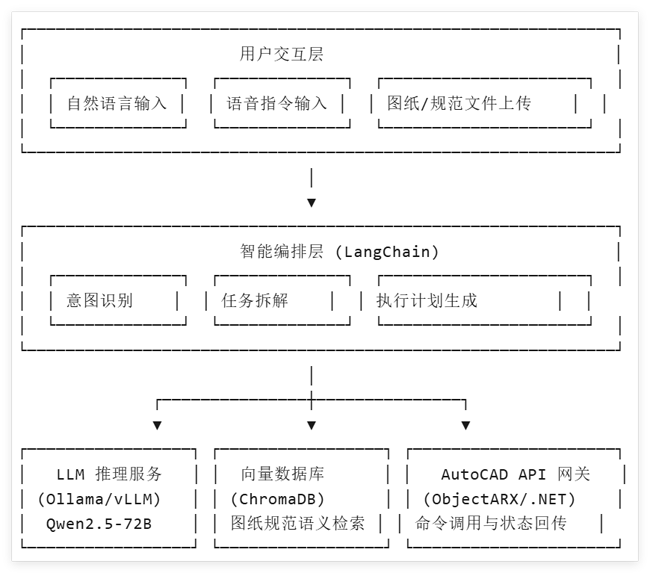
3. Application Scenarios: What the Agent Can Do
The AutoCAD Agent does not replace designers; rather, it frees designers from repetitive, rule-based work so they can focus on creativity and decision-making.
Scenario No. | Application Scenario | Specific Task Description | Expected Efficiency Gain |
|---|---|---|---|
| S01 | Intelligent drafting | Automatically generate standard walls, axes, doors, and windows based on natural language descriptions (e.g., "draw a first-floor plan, bay width 4.2 m, depth 6 m, reserve door and window openings") | Increase by 60%–80% |
| S02 | Code review | Automatically compare drawings with national/enterprise design standards, mark non-compliant items, and provide modification suggestions | Increase by 70%–90% |
| S03 | Layer management | Automatically identify layer attribution based on drawing content, and batch-organize layer names, colors, and line types | Increase by 50%–70% |
| S04 | Dimensioning | Identify graphic boundaries, automatically add dimension chains compliant with national standards, and handle dimension conflicts | Increase by 40%–60% |
| S05 | Drawing comparison | Compare differences between two versions of drawings, generate a change list, and highlight them on the drawing | Increase by 80%–95% |
| S06 | BOM generation | Extract component information from drawings, automatically generate a bill of materials, and export it to Excel | Increase by 60%–80% |
| S07 | Historical reuse | Retrieve similar historical projects based on a vector database, and recommend reusable standard nodes and blocks | Increase by 30%–50% |
| S08 | Collaborative annotation | Convert natural language annotation intent into AutoCAD annotation objects (leaders, text, revision clouds) | Increase by 40%–60% |
4. UltraLAB Hardware Configuration Recommendations (2026v3 Baseline Configuration Table)
Local deployment of large models has clear hardware requirements, especially VRAM capacity and memory bandwidth. The AutoCAD intelligent assistant system needs to run CAD software, local large model inference services, and a vector database simultaneously, placing high demands on CPU single-core performance, GPU VRAM, memory capacity, and storage speed.
4.1 Configuration Selection Overview
Configuration Level | Positioning | Applicable Model Scale | Number of Concurrent Users | Corresponding UltraLAB Model | Estimated Price |
|---|---|---|---|---|---|
| Entry version | Individual designers/small teams | 7B–14B parameter models | 1–2 people | A350 overclocked graphics workstation | ¥25,500–36,000 |
| Standard version | Medium-sized design teams | 32B parameter models | 3–5 people | A350 intelligent image processing workstation | ¥76,000–99,990 |
| Professional version | Large design institutes/enterprises | 70B Q4 quantized models | 5–10 people | GR450P extreme overclocked workstation | ¥92,000–198,000 |
| Flagship version | Group-level/research-level deployment | Multi-model concurrency 70B+ | 10–20 people | GX660M AI computing workstation | ¥142,000–395,000 |
4.2 Detailed Configuration List
Entry Version — A350 Overclocked Graphics Workstation
Recommended models: A35014832-MBX / A35015064-MBX
Component | Specifications | Description |
|---|---|---|
| CPU | Intel Ultra-245K overclocked processor (14 cores, 6 performance cores at 4.8GHz) / Intel Ultra 5-265K (20 cores, 8 performance cores at 5.1GHz) | High main frequency ensures smooth AutoCAD interaction; overclocked architecture improves single-thread response |
| GPU | RTX 5060 8GB / integrated graphics | 8GB VRAM can run 7B–13B quantized models and supports CUDA acceleration |
| Memory | 32GB / 64GB DDR5 | Supports parallel model loading and large AutoCAD drawings |
| Storage | 2TB NVMe SSD + 8TB SATA | Fast startup and project data archiving |
| Monitor | 27" 2K professional graphics display | Detailed presentation of the CAD interface |
| Price | ¥25,500 / ¥36,000 | Cost-effective entry-level solution |
Applicable scenarios: Daily drafting by individual designers + 7B entry-level inference assistance. The A350 series uses Intel Ultra overclocked processors, and its high single-core frequency perfectly matches AutoCAD's interaction response requirements.
Standard Version — A350 Intelligent Image Processing Workstation
Recommended models: A350153128-MCT / AR350148192-MCT
Component | Specifications | Description |
|---|---|---|
| CPU | Intel Ultra 9-285K overclocked processor (24 cores, 8 performance cores at 5.6GHz) | Top-tier desktop processor, zero-latency AutoCAD operation |
| GPU | RTX A2000 / professional graphics card | Professional-grade graphics acceleration and large model inference support |
| Memory | 96GB / 192GB DDR5 | 32B model context cache + large drawing residency |
| Storage | 4TB NVMe SSD + 8TB SATA / larger capacity combination | Project library, model files, vector database |
| Monitor | 32" 2K professional graphics display | Large field of view and parallel multi-window operation |
| Price | ¥76,000 / ¥99,990 | Standard solution for medium-sized teams |
Applicable scenarios: BIM building/infrastructure design, UAV oblique photography real-scene modeling, 32B-level large model inference. 192GB memory can simultaneously host AutoCAD, a 32B quantized model, and a vector database.
Professional Version — GR450P Extreme Overclocked Workstation
Recommended models: GR450P15064-MCT / GR450P150128-MCX
Component | Specifications | Description |
|---|---|---|
| CPU | AMD Ryzen TR-7970X overclocked processor (32 cores at 5.0GHz) / TR PRO-7975WX (32 cores at 5.0GHz) | 32 cores at ultra-high frequency, no pressure for parallel multitasking |
| GPU | RTX 5090 D v2 24GB + water cooling / RTX 5080 16GB | 24GB VRAM supports local inference of 70B Q4 quantized models |
| Memory | 64GB / 128GB DDR5 | Large assemblies + multi-model concurrency |
| Storage | 4TB NVMe SSD + 8TB SATA | High-speed cache + data archiving |
| Cooling | Full water-cooling system | Stable operation under long-term high load |
| Monitor | 27" 2K professional graphics display | Design interface and AI interaction panel |
| Price | ¥108,000 / ¥128,000 | Professional-grade solution |
Applicable scenarios: Large 3D mechanical CAD virtual assembly, 3D printing, reverse engineering, 70B Q4 large model inference. The RTX 5090 D v2 24GB VRAM is the golden configuration for INT4 quantization of 70B models.
Flagship Version — GX660M AI Computing Workstation
Recommended models: GX660M 235640-MD4A / GX660M 229768-MD4H
Component | Specifications | Description |
|---|---|---|
| CPU | 2× AMD EPYC 75F3 (64 cores at 3GHz+) / higher configuration | Dual-socket server grade, 128 cores+ massive parallel computing power |
| GPU | 4× A100 80GB / 4× RTX Pro 6000 96GB (MaxQ version) + water cooling | 320GB+ total VRAM, multi-model concurrent inference |
| Memory | 640GB / 768GB DDR5 | Ultra-large-scale context and multi-model residency |
| Storage | 4TB NVMe + 20TB SATA / larger capacity | All-flash high-speed cache + massive archiving |
| Cooling | Dual-tower water cooling (dual 2000W power supplies) | Sustained stability of 4 cards under high load |
| Monitor | 27" 2K professional graphics display | Multi-window management |
| Price | ¥620,000 / ¥920,000 | Group-level computing power hub |
Applicable scenarios: Group-level design institutes, multi-Agent concurrency, API service deployment, and 5–10 person teams sharing 70B+ model inference. 4× A100 80GB can run multiple 70B model instances simultaneously, supporting team-level intelligent assistant services.
4.3 UltraLAB Full-Series Model Comparison Table
Model Series | Core Positioning | CPU Features | Typical GPU | Memory Range | Applicable Models | Price Range |
|---|---|---|---|---|---|---|
| A350 | Overclocked graphics workstation | Intel Ultra overclocked, high main frequency | RTX 5060–A2000 | 32–192GB | 7B–32B | ¥25,500–99,990 |
| GR450P | Extreme overclocked workstation | AMD TR overclocked, 32 cores at 5.0GHz | RTX 5080–5090 | 64–128GB | 32B–70B Q4 | ¥92,000–198,000 |
| AE450 | Water-cooled graphics workstation | AMD EPYC, up to 128 cores | RTX 5060Ti–5080 | 128–256GB | 70B Q4 | ¥59,990–275,000 |
| AX450 | Water-cooled graphics workstation | Xeon, up to 128 cores | RTX 5060Ti–5080 | 128–256GB | 70B Q4 | ¥116,000–192,000 |
| EA660 | Full water-cooled dual-socket workstation | Dual AMD EPYC, up to 256 cores | RTX 5080–5090 | 192–768GB | 70B Q4–fine-tuning | ¥89,990–420,000 |
| GX660M | AI computing workstation | Dual AMD EPYC | 4×A100 / 4×RTX Pro 6000 | 640GB–1TB | Multi-model concurrency | ¥142,000–1,150,000 |
| AlphaPro660 | Super graphics workstation | Dual AMD EPYC, up to 256 cores | RTX Pro 5000–H200 | 512GB–1.5TB | Full-parameter fine-tuning | ¥330,000–999,900 |
5. Frequently Asked Questions: In-Depth Analysis of Hardware Configuration
5.1 How Much VRAM Is Actually Needed?
Model Scale | FP16 VRAM Requirement | INT8 Quantization Requirement | INT4 Quantization Requirement | Recommended UltraLAB Model |
|---|---|---|---|---|
7B | ~14 GB | ~7 GB | ~4 GB | A35014832-MBX (RTX 5060 8GB) |
14B | ~28 GB | ~14 GB | ~7 GB | A35015064-MBX (RTX 5060 8GB + memory offload) |
32B | ~64 GB | ~32 GB | ~16 GB | AR350148192-MCT (192GB memory + integrated graphics offload) |
70B | ~140 GB | ~70 GB | ~35 GB | GR450P15064-MCT (RTX 5090 D v2 24GB × 2) |
110B | ~220 GB | ~110 GB | ~55 GB | GX660M 229768-MD4H (4×RTX Pro 6000 96GB) |
Core conclusion: VRAM is the first bottleneck for local deployment. For the AutoCAD intelligent assistant, a 32B model is the optimal choice balancing accuracy and efficiency (about 16–18GB after INT4 quantization). It is recommended to pair it with the A350 with 192GB memory or the GR450P series with 24GB VRAM. If a 70B model is required, the dual-card RTX 5090 D v2 24GB of the GR450P or the 4×A100 of the GX660M is the most cost-effective solution.
5.2 The Dual Role of the CPU in AutoCAD + AI
Role | Specific Tasks | Performance Requirements | Recommended CPU |
|---|---|---|---|
| CAD interaction core | AutoCAD real-time rendering, command response, drawing operations | Single-core high frequency ≥ 5.0GHz | Intel Ultra 9-285K (5.6GHz) |
| AI inference assistance | Tokenize, prompt assembly, post-processing decoding | Multi-core parallelism + memory bandwidth | AMD TR-7970X (32 cores at 5.0GHz) |
| Vector retrieval | ChromaDB semantic search, historical drawing matching | Sensitive to memory capacity | Prioritize large-memory configurations |
Recommendation: AutoCAD is single-core-sensitive software, so prioritize CPUs with high main frequency. The Intel Ultra overclocked processors (5.1–5.6GHz) of the A350 series are the golden configuration for CAD interaction; if large model inference is also run simultaneously, the AMD TR-7970X (32 cores at 5.0GHz) of the GR450P balances high single-core frequency and multi-core parallelism.
5.3 What Is the Relationship Between Memory and VRAM?
Scenario | Memory Requirement | Description |
|---|---|---|
7B model + conventional CAD | 32GB | Standard on A35014832-MBX, meeting basic needs |
14B model + large drawings | 64GB | Standard on A35015064-MBX, with part of the model weights offloaded to memory |
32B model + large model | 128–192GB | Standard on AR350148192-MCT, with memory serving as secondary cache when VRAM is insufficient |
70B model + multitasking | 256GB+ | GR450P150128-MCX / AE450 series, multi-model concurrency |
Vector database + historical drawings | +64–128GB | Million-level vector indexes resident in memory |
Recommendation: Memory capacity ≈ VRAM capacity × 35 times. When VRAM is insufficient and CPU offload is enabled, memory bandwidth directly determines inference speed. The UltraLAB A350 series supports up to 192GB DDR5, the GR450P series supports 128GB, and the dual-socket EA660/GX660M series support 768GB1.5TB.
5.4 Why Is SSD Important?
File Type | Typical Size | Loading Time Comparison (SATA SSD vs NVMe Gen4) |
|---|---|---|
7B model weights (FP16) | ~14 GB | 35s → 8s |
70B model weights (INT4) | ~40 GB | 100s → 25s |
Large CAD drawings | 50–200 MB | 5s → 1s |
Vector database (1 million entries) | 2–5 GB | 10s → 2s |
Recommendation: The entire UltraLAB series comes standard with NVMe SSDs (2TB–8TB); model files should preferably be stored on NVMe Gen4 SSDs. The A350 series offers a 2TB NVMe + 8TB SATA combination, while the GR450P/GX660M series offer a 4TB NVMe + 8/20TB SATA combination, meeting the dual needs of high-speed access to hot data and archiving of cold data.
5.5 Why Recommend UltraLAB Instead of an Ordinary Gaming PC?
Comparison Dimension | Ordinary Gaming PC | UltraLAB Workstation |
|---|---|---|
| Stability | Optimized for intermittent peak loads | Designed for 7×24-hour continuous inference, with full water-cooling |
| Expandability | At most 2 GPU slots, limited power headroom | Supports 4 GPUs, redundant power supplies, dual-tower cooling |
| ECC memory | Not supported | Supported on professional/flagship versions to prevent data errors during long-term operation |
| Overclocking optimization | None | The A350/GR450P series are specially optimized for overclocking, improving AutoCAD single-core performance by 15%–20% |
| ISV certification | None | Certified by ISVs such as AutoCAD and SolidWorks |
| After-sales service | Consumer-grade warranty | 3-year on-site service + dedicated technical engineer support |
| Large model support | No official optimization | The entire series comes preinstalled with the Ollama environment and supports remote testing |
5.6 What Are the Network Requirements for an AutoCAD Agent?
Deployment Mode | Network Requirements | Applicable Models |
|---|---|---|
| Standalone local | No external network required, fully offline | Full A350 / GR450P series |
| Team sharing | LAN 2.5GbE–10GbE | GX660M series (built-in multiple network ports) |
| Remote access | Public network bandwidth ≥ 100Mbps | The entire series supports remote desktop/SSH |
The entire UltraLAB series supports local deployment of large models without relying on cloud APIs, ensuring the security of drawing data. The GX660M series is equipped with 10GbE network ports and supports team-level API service deployment.
6. Quick Deployment Guide (Get Started in 30 Minutes)
6.1 Environment Preparation (10 Minutes)
# 1. Install Ollama (can be skipped in the UltraLAB preinstalled environment)
# Download address: https://ollama.com/download

# 2. Verify installation
ollama --version

# 3. Pull a model suitable for local operation (taking Qwen2.5-Coder 14B as an example)
ollama pull qwen2.5-coder:14b

# 4. Start the model service
ollama run qwen2.5-coder:14b
6.2 AutoCAD Plugin Integration (15 Minutes)
Use the AutoCAD .NET API to develop a simple command invocation middleware:
// AutoCAD Agent command bridging example
[CommandMethod("AIAGENT")]
public void ExecuteAgentCommand()
{
    // 1. Get the current drawing state
    Document doc = Application.DocumentManager.MdiActiveDocument;
    Database db = doc.Database;

    // 2. Call the local LLM service (Ollama HTTP API)
    string prompt = "Based on the current drawing, suggest locations for adding dimensions";
    string response = CallLocalLLM(prompt);

    // 3. Parse the instructions returned by the LLM and execute them
    ExecuteCadCommands(response, db);

    // 4. Verify the execution result and provide feedback
    bool success = ValidateResult();
    if (!success) {
        // Agent self-correction: retry or request manual confirmation
        HandleFailure(response);
    }
}
6.3 Vector Database Initialization (5 Minutes)
import chromadb

# Create/load a local vector database
client = chromadb.PersistentClient(path="./cad_knowledge_db")

# Create a drawing standards collection
collection = client.create_collection(name="design_standards")

# Import enterprise design standards (automatic vectorization)
collection.add(
    documents=["Wall thickness standard: load-bearing walls shall not be less than 240mm", "Requirements for door and window lintel settings..."],
    metadatas=[{"category": "structure"}, {"category": "opening"}],
    ids=["std_001", "std_002"]
)
7. Conclusion
The gap between a chat assistant and an Agent is not simply a matter of "how many features" it has, but the essential difference of **"whether it can truly intervene in and complete actual work"**.
Only by understanding this difference can you have a clear judgment framework for the wide variety of "CAD AI assistant" products on the market, and more accurately understand what problem the AutoCAD Agent technical route is really trying to solve.
As large models move from the cloud to local deployment, and as Agents move from "suggestions" to "execution," designers' workflows are being redefined. Choosing the right hardware, building a stable local inference environment, and understanding the capability boundaries of Agents—these three things will determine how far you can go in the wave of AI-assisted design.
Take action now: Visit the UltraLAB official website to obtain a customized configuration plan, or contact the AECDESK technical team to obtain beta access to the AutoCAD Agent prototype plugin. The entire UltraLAB series supports remote testing, so you can try before you decide.
This article is compiled based on the AECDESK "Industrial Software × AI Observation" series and was first published in August 2026.
Keywords: AutoCAD Agent, AI intelligent assistant, local deployment of large models, Ollama, Qwen2.5, UltraLAB workstation, CAD hardware configuration, vector database, LangChain, design automation, A350, GR450P, GX660M
Disclaimer: The views in this article represent only the author's views Copyright belongs toZhuwei Architectural Technology.
Please do not reprint without authorizationWelcome to share on Moments
When reposting, please indicate the source:Zhuwei Architectural Technology
• END •
Shanghai Zhuwei Architectural Technology Co., Ltd. is a new-type technical service enterprise specializing in comprehensive building design optimization, BIM design consulting, and prefabricated building design consulting. It is a high-tech enterprise and a national technology-based small and medium-sized enterprise . The company has established a comprehensivequality management and standardization system, and has successively passed theISO 9001 quality management system certification, ISO 14001 environmental management system certification, and ISO 45001 occupational health and safety management system certification. The team is composed of former technical backbones from design institutes, former senior managers from real estate companies, BIM engineers, prefabricated building engineers, and others, providing comprehensive building engineering design optimization and refined drawing review, building BIM design consulting and MEP detailed design, and prefabricated building design consulting and detailed design services.
In the building design optimization business, the company positions itself as an extension and supplement to the design management of real estate companies, deeply cultivating comprehensive design consulting and optimization for civil buildings, adhering to the concept of "professionalism creates value, service builds quality," focusing on customer and market needs, and controlling the economy, rationality, and safety of the design throughout the process or at important stages required by the owner, saving unnecessary costs for customers and significantly improving drawing quality, achieving the goal of "reducing costs and increasing efficiency."
In the BIM design consulting business, we cooperate with many large and excellent real estate groups/design institutes/general contracting units in the industry, and the building products covered by consulting services include all building types. Service stages cover BIM consulting, design-stage BIM, construction-stage BIM, forward BIM design, and more. We provide high-quality residential design, premium basement design, and more. Through digital construction technology, we assist designers in reducing design errors and optimizing design quality during the design stage, and assist construction units in saving costs and completing high-quality MEP installation planning during the construction stage; we collaborate with mainstream software service providers in the industry to help customers manage the building construction stage; and we can apply BIM models to the operation and maintenance stage (LOD500: model precision reaches the operation and maintenance level).
In the prefabricated building design consulting business, we use a BIM software platform to implement PC component detailed design services. The spatial parameters and reinforcement of PC components can be modified and adjusted in a linked manner in the BIM model, avoiding and resolving all rebar collision issues in advance. We provide lightweight model delivery, where what you see is what you get, making it convenient for all parties to conduct visualized review in advance. We can provide digital delivery according to the requirements of Industry 4.0, provide BOM list data, provide the overall dimensions of all PC components, statistical data on metal parts, and the spatial cutting dimensions of each rebar, and use IoT technology to provide support services for the production, storage, transportation, and installation of PC components. Compared with traditional PC detailed design companies in the industry, Zhuwei can provide customers with systematic technical solutions and construction services for specific building products, especially in the field of heavy-duty logistics warehouses and industrial multi-story buildings.
The company has an expert team and senior technical personnel with backgrounds in large Grade-A design institutes. All professional technical personnel have solid professional foundations and rich dual work experience in design institutes and optimization companies, and their technical level and cost control capabilities are in a leading position in the industry.
END
The views expressed are the author's own Copyright © Zhuwei Architectural Technology
Reproduction without authorization is prohibited
Please credit the source when reposting: Zhuwei Architectural Technology
Zhuwei Architectural Technology is a new-type technical services company specializing in integrated design optimization, BIM consulting and prefabricated construction design consulting. Our team brings together senior engineers from leading design institutes, former executives of real-estate companies, BIM engineers and prefabrication engineers, delivering integrated design optimization, refined drawing review, BIM consulting with MEP detailing, and prefabricated design services.
Design optimization consulting: Positioned as an extension and complement to the design management of real-estate developers, we focus on consulting and optimization for civil buildings. Across the whole process — or at key stages required by the client — we control the economy, rationality and safety of the design, eliminating unnecessary cost while measurably improving drawing quality, achieving "lower cost, higher efficiency".
BIM consulting: Through digital construction technology we help designers reduce errors and improve quality in the design phase, help contractors save cost and plan high-quality MEP installation in the construction phase, and extend BIM models into facility management for the operation phase — in collaboration with mainstream software vendors.
Prefabricated design consulting: Whole-process design on BIM platforms, using Revit and Tekla for PC detailing. Component geometry and reinforcement are linked parametrically — what you see is what you get. We deliver Industry 4.0-ready drawings with cut-length data for every rebar, and IoT-enabled support for production, storage, transport and installation of PC components.
Our expert team comes from leading design institutes, with deep technical grounding and extensive experience in dual-track design and optimization; its technical capability and control are industry-leading.
—— This article is auto-synced from the WeChat Official Account “Zhuwei Architectural Technology”. Read the original ——